Installers, contractors & consultants
Built for the people who wire the site.
Nohmad Edge CSMS is on-site EV charging management that electrical contractors commission in a browser and consulting engineers can design to, with documented behaviour for every failure. Model the real switchboard tree, attach the meters, set safe currents, and hand over a site that keeps its chargers inside their limits with no internet connection.
- browser commissioning wizard
- 13 stages
- documented, experienced engineer
- 30–45 min
- meter presets + register maps
- Modbus-TCP
- any AC smart-charging charger
- OCPP 1.6J
- Incomer400 A/phaseUPM209 · Modbus-TCPkW demand cap
- Main switchboard320 AMetered
- EV board 1160 AUPM309 · register map
- Bays 1–1032 A eachOCPP 1.6J
ten 32 A three-phase chargers: 320 A per phase on a 160 A board
- EV board 280 AVirtual meter
- Bays 11–1432 A eachOCPP 1.6J
- Mechanical servicesNon-EV load, measured
Why it makes the job easier
Four ways a charging job goes wrong, and our answer to each.
You carry the site after handover, so these are the risks that matter.
The risk
Commissioning eats the day
Our answer
An installer script, then a 13-stage browser wizard, documented at 30–45 minutes for an experienced engineer. Everything after the script happens in a browser.
The risk
The controller only manages one brand
Our answer
Any AC charger that implements OCPP 1.6J smart charging, and any Modbus-TCP meter through a register map. You pick the hardware for the job.
The risk
Callbacks you can't diagnose
Our answer
Alarms reach the service desk by webhook, the console shows per-phase headroom for every board, and every allocation is logged and can be replayed exactly.
The risk
A vendor that disappears
Our answer
Edge CSMS runs on the box, with no cloud to switch off. The chargers aren't ours either: point them at another CSMS if the site ever moves on.
For electrical contractors
What does commissioning an Edge CSMS site involve?
An installer script on the industrial PC, then a 13-stage browser wizard, documented at 30–45 minutes for an experienced engineer. The work is modelling the switchboard tree and its limits, attaching the meters, accepting the chargers, and setting safe currents and fail-safe behaviour.
- 01
Install the box
Run the installer script on the industrial PC (Ubuntu LTS with Docker), then open the commissioning wizard in a browser on the site network.
- 02
Model the real switchboard tree
Incomer → switchboards → branches → bays, each node with its own current limit. A charger's allowance is the tightest limit above it, per phase where meters and charger phase mappings exist.
- 03
Attach the meters
Pick a built-in preset (Algodue UPM209, Eastron SDM630), enter a Modbus-TCP register map for the Algodue UPM309 or any other Modbus-TCP meter, or point a Shelly Pro 3EM at the box's own MQTT broker.
- 04
Correct what the site gives you
Phase-rotation correction for CTs installed on rotated conductors. Boards with no meter become virtual meters, derived from what is metered beneath them and attested at commissioning.
- 05
Accept the chargers
Unknown chargers wait in Pending until you approve them. On connect, Edge CSMS reads each charger's ChargeProfileMaxStackLevel and raises an alarm if the charger can't hold the profiles it needs.
- 06
Set safe currents and fallbacks
A per-charger safe current for fail-safe, and an offline fallback profile (10 A by default) for any charger that loses contact with the box.
- 07
Observe, then enforce
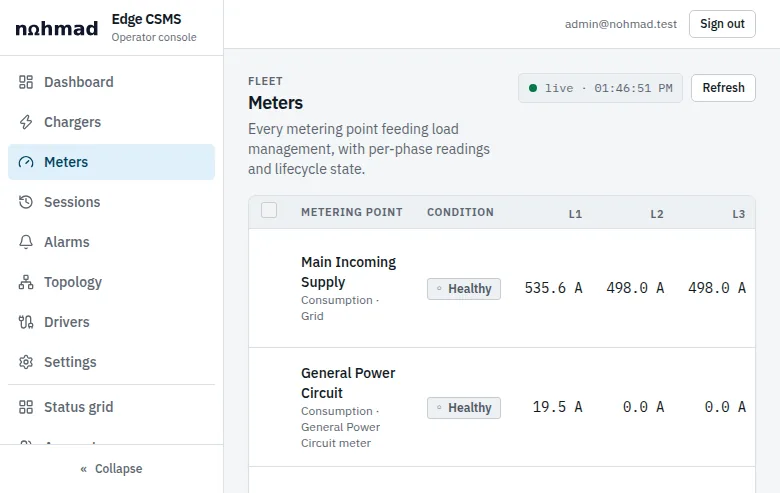
New installs commission meter plausibility in observe mode. Once readings agree with your instruments, switch to enforce: a meter reading less than the EV load beneath it is then treated as dark.
- 08
Send alarms where someone acts
Alarm webhooks (JSON) to your service desk or the site's, from 42 live alarm types, so faults land with whoever maintains the site.
Which meters can you use?
| Meter | Connects over | In Edge CSMS |
|---|---|---|
| Algodue UPM2094-module DIN-rail three-phase analyser. UPM209RGW kits come with Rogowski coils of 30, 45, 70 or 90 cm. | Modbus-TCP (Ethernet version) | Built-in preset |
| Algodue UPM30996 × 96 mm panel analyser; UPM309RGW is the Rogowski variant. | Modbus-TCP | Register map |
| Eastron SDM630 | Modbus-TCP | Built-in preset |
| Any other Modbus-TCP meterAddress, data type, scale and byte order per register. | Modbus-TCP | Register map |
| Shelly Pro 3EM | MQTT, into the box's own broker | Supported |
| Boards with no meterDerived from what is metered beneath, attested at commissioning. | None | Virtual meter |
- Meters are polled every second by default. Modbus-RTU meters need a Modbus-TCP gateway.
- The UPM209 preset has been validated against an emulated meter so far.
- Rogowski coils wrap around existing cables and busbars, which suits retrofits in live switchrooms.
For consulting engineers
How does load management relate to maximum demand under AS/NZS 3000?
AS/NZS 3000 clause 2.2.2 allows maximum demand to be determined by calculation, assessment, measurement or limitation. Electric Vehicle Council guidance treats a load-management system as creating a definite duty cycle under the assessment method, with protective devices as the limitation backstop. The designer decides, and carries the responsibility.
We won't tell you a site's maximum demand is settled because Edge CSMS is installed. That judgement is yours. What we can give you is exactly how the limit is enforced, and exactly how it fails.
Exactly how the limit is enforced
- Budget
- Each node's current limit minus its measured non-EV load. Cascading: a charger's allowance is the tightest limit of every node above it.
- Phases
- Per phase (L1, L2, L3) where meters and charger phase mappings exist; otherwise on the worst phase.
- Cadence
- Meters polled every 1 s by default. Allocation every 10 s, configurable from 5 to 15 s.
- Sharing
- Equal current (the default) or equal power, selected by the operator.
- Floor and dwell
- Below a 6 A floor a bay pauses, or holds at the floor, by policy. 60 s between setpoint changes; 90 s between pause and resume.
- Demand caps
- Instantaneous kW and rolling-average kW (window in minutes), on the incomer only. Needs metered voltage at the incomer. kW at a power factor of about 1, not kVA.
- Signalling
- OCPP 1.6J Smart Charging, SetChargingProfile: a TxProfile for live sessions and a TxDefaultProfile for idle connectors.
- Capability probe
- On connect, reads each charger's ChargeProfileMaxStackLevel and raises an alarm if the charger cannot hold the profiles it needs.
- Offline fallback
- A TxDefaultProfile, 10 A by default, so a charger that loses contact with the box has a safe default limit instead of none. Under OCPP 1.6 §3.13.6, a session already running keeps its last transaction profile (its last allocation); the fallback governs sessions without one.
- Non-complying chargers
- A charger that ignores its limit is clamped to 0 A, probed in steps, then reset, soft then hard, with alarms. Silent for more than 300 s, or rejecting a profile: its bay is clamped to 0 A with a critical alarm.
- Record
- Every allocation is written to a deterministic tick log and can be replayed exactly, for design review or incident analysis.
Documented failure behaviour
What happens when something fails?
Every failure below has a defined response, and none depends on the internet. Load management sits on top of your protection, never instead of it: breakers remain the last line.
- A meter goes stale (60 s by default)
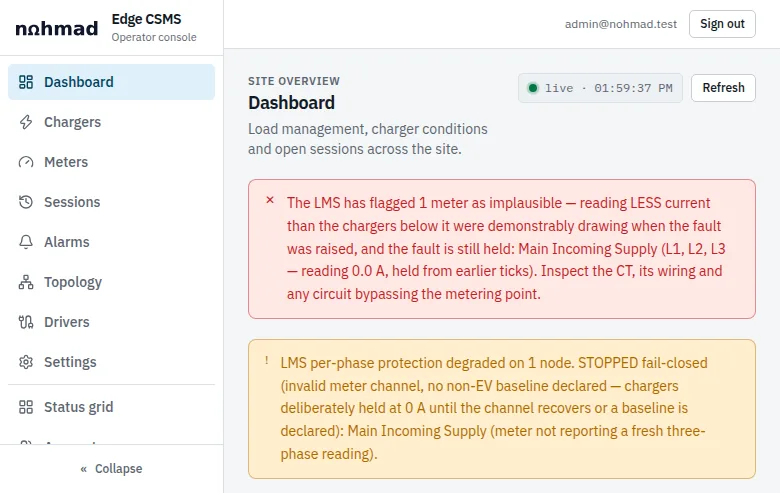
- LMS fail-safe: active chargers drop to their per-charger safe current, new sessions start only at safe current, and a critical alarm is raised.
- One phase channel goes dark
- That board fails closed at 0 A, unless a non-EV baseline is declared for it.
- A meter reads less than the EV load beneath it, such as a dead CT
- Flagged implausible and treated as dark, when plausibility enforcement is on. New installs commission in observe mode.
- A charger ignores its limit
- Clamped to 0 A, probed in steps, then taken through a soft-then-hard reset ladder, with alarms.
- A charger goes silent for more than 300 s, or rejects a profile
- Its bay is clamped to 0 A and a critical alarm is raised.
- A charger loses contact with the box
- A running session keeps its last transaction profile (its last allocation). The offline fallback profile, 10 A by default, governs sessions without one.
- The allocation engine wedges
- A 30 s watchdog forces fail-safe.
- The internet drops
- Nothing changes. There is no cloud dependency.
- The Edge CSMS box loses power
- Nothing in software can act. Chargers hold their last setpoint, and your breakers are the backstop. Design protection on that basis.
Engineering evidence
What sits behind the engine?
Numbers from simulation, and the rules every change has to pass. Ask us for the detail behind any of them.
In simulation
120chargers
99.75%
0.2%
≤ 3ms
Five engineering principles, each enforced in CI
- Purity
- Clamp at boundary
- Replay determinism
- Scheduler-owned time
- Evidence-field stability
Backed by thousands of automated tests. Replay determinism is what makes the tick log useful: the same inputs replay to the same allocation, so a design review or an incident can be walked through step by step.
Design checklist
What to capture on the site visit.
Everything an Edge CSMS design needs from the first visit. Bring it to us and we'll work through the topology and metering with you.
Supply
- Supply rating per phase (A), single- or three-phase
- Interval data from the retailer or metering provider, or a logger on the incomer over a representative period
- The network tariff and its demand window, if a demand cap is in scope
- Power factor at the incomer, if the tariff bills kVA
Switchboards
- Board schedule: incomer, main switchboard, distribution boards and branches, with protective device ratings
- Phase allocation of every existing and planned charger circuit
- Which boards get a meter and which become virtual meters, and space for the meter and its CTs or Rogowski coils
- Large non-EV loads on each board: lifts, pumps, compressors, chillers
Network
- Ethernet path from each meter and charger to the switchroom
- A DIN-rail position and supply for the industrial PC
- Whether charging will sit on a segregated operational network
Chargers
- Make, model and firmware version of every charger
- OCPP 1.6J with Smart Charging implemented, and its ChargeProfileMaxStackLevel
- Single- or three-phase, and the lowest current it regulates to
- Authorisation: plug-in auto-start or RFID
Design decisions
- The maximum-demand method under AS/NZS 3000, decided by the designer
- Board limits and, if used, the kW demand cap with its margin
- Per-charger safe current and the offline fallback current
Not sure how much capacity the site has? Run the supply rating and measured peak through the calculator first.
Capacity calculatorWork with us
We're building our network of installers and consultants.
If you design or install EV charging for apartment buildings, depots, workshops or commercial sites, get in touch. There are no tiers to sign up to: talk to us about a site, or about working together.
Where you'll use it:
What you get from us
- Commissioning documentation, and a person to talk to through design and commissioning.
- Straight answers on what has been tested. There is no published charger compatibility list yet, so we'll tell you what we know about a model before you specify it.
- A product that keeps working without us: no cloud dependency, and chargers that can be pointed at another CSMS.
- An Australian company to deal with: Nohmad Electronics, in Melbourne. The Edge CSMS software is built in Australia.
FAQ
Questions installers and engineers ask.
Further reading
Which chargers can I install with Edge CSMS?
Any AC charger that implements OCPP 1.6J smart-charging profiles, single- or three-phase. Edge CSMS has been tested on simulators (120 chargers) and on real chargers, including an Orbis VIARIS UNI. There is no published compatibility list yet, so check a model with us before you specify it. DC charger support and OCPP 2.0.1 are on the roadmap.
Which meters does Edge CSMS support?
Built-in presets for the Algodue UPM209 over Modbus-TCP (validated against an emulated meter so far) and the Eastron SDM630. The Algodue UPM309 and any other Modbus-TCP meter connect through a configurable register map (address, data type, scale and byte order); there is no built-in UPM309 preset. Shelly Pro 3EM meters publish over MQTT into the box's own broker. Modbus-RTU meters need a Modbus-TCP gateway, and boards without a meter can be modelled as virtual meters.
How long does commissioning take?
The software side, an installer script followed by a 13-stage browser wizard, is documented at 30–45 minutes for an experienced engineer. Installing the meters, chargers, cabling and industrial PC comes on top, as on any job.
How does Edge CSMS behave if the meter fails?
If a meter goes stale (60 seconds by default), the site enters fail-safe: active chargers drop to their per-charger safe current, new sessions start only at safe current, and a critical alarm is raised. If one phase channel goes dark, that board fails closed at 0 A unless a non-EV baseline is declared. A meter reading less than the EV load beneath it, such as one with a dead CT, is treated as dark when plausibility enforcement is on.
How does load management relate to AS/NZS 3000 maximum demand?
AS/NZS 3000 clause 2.2.2 allows maximum demand to be determined by calculation, assessment, measurement or limitation. Electric Vehicle Council guidance treats a load-management system as creating a definite duty cycle under the assessment method, with protective devices as the limitation backstop. The designer chooses the method and carries the responsibility. Load management sits on top of protection, never instead of it.
What happens to the chargers if the Edge CSMS box loses power?
Nothing in software can act. Chargers hold their last setpoint: under OCPP 1.6 a running session keeps its last transaction profile, and the offline fallback profile (10 A by default) governs sessions without one. Your breakers are the backstop, so design protection on that basis.
Do you have an installer programme?
Not a formal one with tiers. We're building our network of installers and consultants, and we'd rather start with a conversation: tell us about yourself and the sites you work on through the contact page, choosing Installer or consultant.
Got a site in mind? Bring the board schedule.
Tell us about the supply, the boards and the chargers. We'll work through the topology and metering with you, and tell you plainly what Edge CSMS can and can't do there.